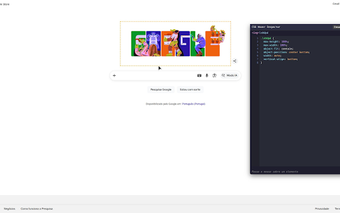
Quick, hover-based CSS inspection for developers and designers
CSS Hover Inspector, from raoneinet.ing, is a Chrome extension for rapid visual inspection of page styles during design and development tasks. The tool overlays computed style data on elements so you can check CSS without opening the full debugging panel. It offers copy-to-clipboard for extracted rules and a minimal overlay, and supports modern CSS layouts. It is intended for front-end engineers, UI designers, and students who need fast, low-friction style checks during iterative work.
How much overhead does the extension add during browsing?
The publisher describes the extension as lightweight with minimal impact on browser speed, positioning it as an inspection layer suitable for active design sessions. Activation and deactivation are handled from the Chrome toolbar icon, so users control when the overlay runs. That on-demand model reduces accidental inspection during normal browsing and keeps the tool from continuously consuming resources when not needed.
Does it run on every webpage and in all browsing contexts?
Functionality covers most standard web pages, but the extension may not operate on highly restricted or system-level browser pages, so it cannot replace built-in tools in every context. That limitation matters when auditing browser chrome or extension pages. For regular site audits and component checks the tool functions across typical sites, making it a practical addition to page-level review routines rather than a universal inspector.
Can it handle modern layout systems and typography?
The extension reads computed values for contemporary CSS, which helps when dissecting responsive components and validating visual decisions. Supported areas include:
- Flexbox
- Grid
- Typography
Who benefits most from adding this to their workflow?
The extension suits front-end engineers, UI designers, and students who need rapid, on-the-fly verification during design iterations rather than full debugging sessions. Its narrow focus and small footprint appeal to people who prefer quick visual checks over exhaustive instrumenting. Teams that split responsibilities between designers and developers can use the tool to communicate concrete computed values during handoffs, speeding the design-to-code conversation.
A targeted companion for quick style checks, not a full debugger
The extension is a practical, targeted utility for designers and front-end engineers who value rapid visual confirmation during iterative work. It sacrifices exhaustive diagnostics for a smaller, faster inspection layer that complements standard debugging suites. Use it as a short-lived verification tool within review sessions and rely on full developer tooling when tracing interaction bugs or scripting issues.